Best Practices for SMS
PROTECT YOUR Number From Being Banned by Phone Carriers For Risky Words And Phrases
Use these carrier-safe alternatives to keep your Molto campaigns compliant with SMS Carrier restrictions—especially if your business has been flagged as being in a higher risk category like cannabis, payday loans, 3rd party financing, and cryptocurrencies.
YOUR #1 Best Option -
When asked about payments, financing etc., take the conversation to a different channel:
"Great question! Carriers are picky about us texting financial details. Can I send specifics to your email, or can I give you a quick 30-second call?"
(Great news, we created a snippet for this - more on that later)
Instead of saying this — say THIS.
Phone Carriers like AT&T and Verizon actively block messages containing certain financing and credit-related phrases. Use this side-by-side guide to rewrite risky copy into compliant, high-converting alternatives.
Risky Phrases
Avoid Sending As-Is
"You're pre-approved for $3,000 today!"
"No credit needed. Everyone gets approved."
Your down payment is $50.
"Are you wanting to finance your wheels? "
"Apply on our website. Bad credit is no problem.
You can choose from one of our 3rd party finance companies like Acima or Snap.
Patterns to avoid: "pre-approved", "no credit", "credit check", "credit score", "guaranteed approval", and aggressive financing language that sounds like lending guarantees.
Safer Alternatives
Send This Instead
"We have you set up for the $3000 deal"
"We have programs that consider more than just your score?"
"The initial cost is only $50 to get started"
"Ready to get those wheels on the road using our flexible in-store program?"
"See your spending limit instantly on our website with no impact to your history."
We have a several program options depending on your weekly budget.
Focus on eligibility, options, and reviewing terms instead of promises of approval or guaranteed financing.
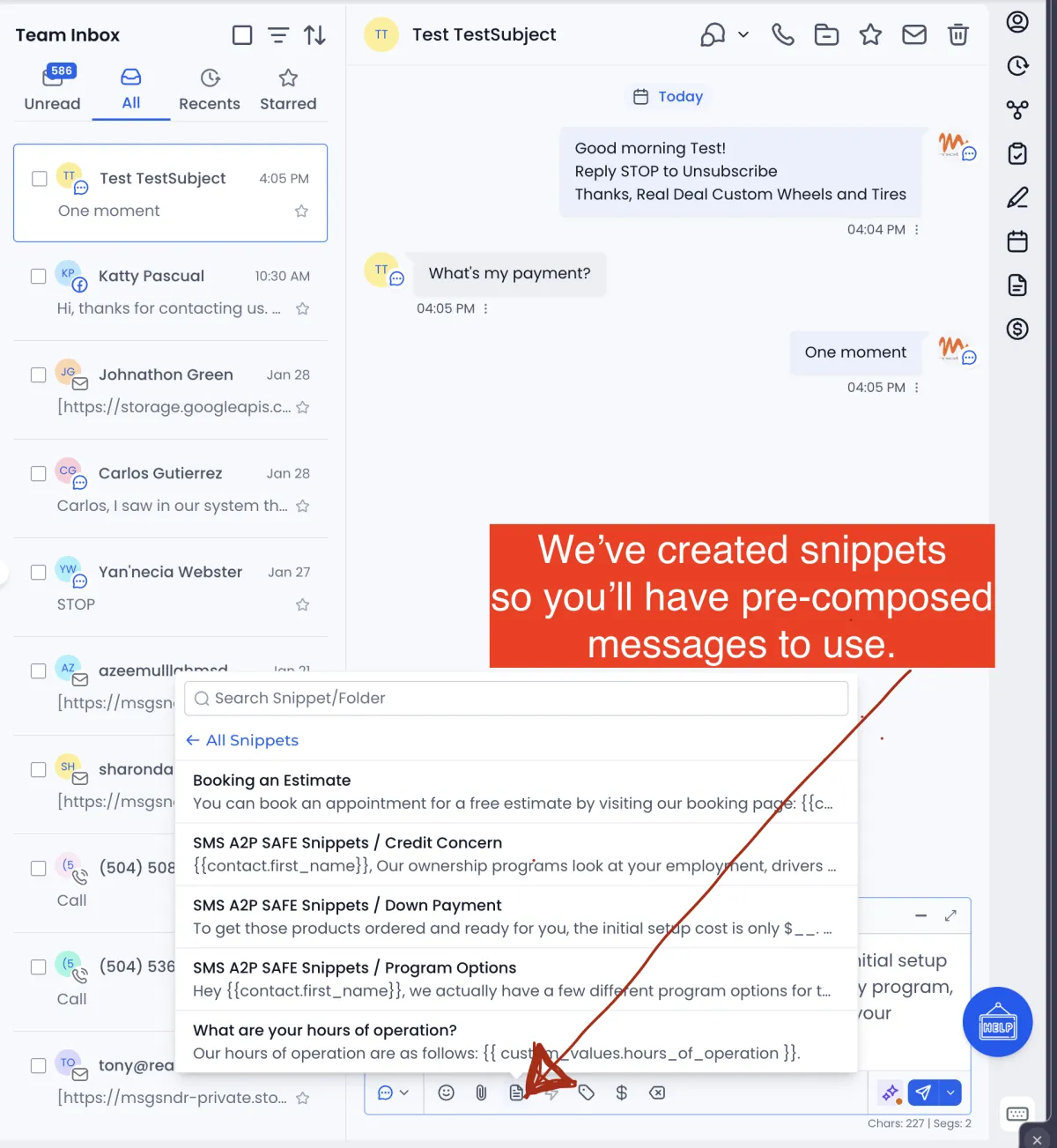
You'll find the Snippet icon at the bottom of the text input window. We've pre-composed many snippets to help you quickly respond to questions from customers, offering peace of mind from the stress of wondering which words are safe to use.
Snippets Speed The Flow And Protect You From Bans.
Use Snippets stored in your Inbox Conversation Window to keep your responses swift and compliant.
1. Comparing Lenders - Snippet Name: Program Options
Copy: Hey , we actually have a few different program options for that product, all based on your weekly budget rather than just a history.
2. Snippet Name: Credit Concern
Copy: , Our ownership programs look at your employment, drivers license and insurance, and residence. It's a very simple setup!
3. Snippet Name: Down Payment
Copy: "To get those products ordered and ready for you, the initial setup cost is only $__. That covers the start-up of your weekly program, and we can have you rolling today. Does that work for your budget ?"
4. Reviving a Stalled Application - Snippet Name: Approved Re-Activation
Copy: Hey , I noticed your account setup was almost finished. Your shopping limit is still active, and we're running some great deals this week. Ready to get started?
Three Golden Rules To Employ
Consider these concepts when communicating via SMS text. (Messenger too!)
Carriers hate generic "blasts." If the managers use the customer’s name and mention a specific vehicle or wheel style, the message looks like a 1-to-1 conversation, which is less likely to be flagged by automated spam filters.
Bad: "Get $3k for wheels today!"
Good: "Hey [Name], your $3k shopping limit for those wheels is waiting for you at our store."
2. Move the "Nitty Gritty" to Voice or Link
If a customer asks a direct question about payments or specific lenders, the team should avoid answering via SMS.
The Script: "Carriers are picky about us texting financial details. Can I send specifics to your email, or can I give you a quick 30-second call?" (NOTE: there's a snippet for this)
3. The "Service First" Approach
The more the text sounds like a service update, the safer it is.
Safe: "Your wheels are in stock!"
Safe: "Are you still coming by the store today?"
Safe: "We just updated our inventory, want to see some new arrivals?"
Avoid ALL CAPS like "GET PRE-APPROVED NOW". This is an instant red flag for carrier filters.
Watch the Molto SMS Compliance Walkthrough
(COMING SOON) In this short video, we add context and show exactly how to structure campaigns inside Molto, spot risky phrases, and keep your sending reputation healthy.